
October 8, 2025
We have refreshed the application’s foundation, removing outdated code and mobile-specific fragments. The interface is now optimized for use on desktops. A cleaner code base and updated technology mean enhancements in speed and stability for your daily work.
Better usability—even in smaller windows
You can now resize the application window, and all key actions and functionalities will remain available—even when working with a reduced window size. This addresses a previous limitation where certain features would disappear upon resizing.
Faster Job details
Selecting a job now displays details more quickly, with a new loading indicator so you always know what’s happening behind the scenes. The job detail view is now built on modern UI components for a more consistent look and feel, improving performance and reliability.
August 26, 2025
This update gives operators clear control and visibility over printer calibration—directly in ColorProof GO.
Printer calibration control in ColorProof GO
Operators can now control the calibration process of connected printers without leaving the browser.
-
Start or cancel calibrations from the Printers tab in the right-hand detail panel for each printer. On cancel, the system immediately reverts to the last valid calibration.
-
Track all calibration states reported by GMG ColorProof (for example, pre-linearization, calibration, iterations, success and error). If a calibration fails, the detailed error message from GMG ColorProof is shown in ColorProof GO so everyone understands what happened. On success, the completion status is shown together with the local date and time, so it’s always clear when the printer was last calibrated.
- Manage multiple calibration sets per printer. Each set displays its own status and last successful calibration timestamp, and you can start or cancel per set independently.
Requires GMG ColorProof 5.17.0.49 (or newer) on the connected system to enable full calibration control from ColorProof GO. With older versions, controls are shown disabled with a tooltip explaining the requirement.
Only printers with an integrated measuring device supported by AutoCaliWizard in GMG ColorProof can be calibrated remotely. If you start calibration on an unsupported printer, the process will not initiate and no changes are made
Minor user experience improvements
This release includes minor user experience improvements such as a refactored media change dialog, improved spacing across panels for better readability, and restoration of missing tooltips on job actions.
Stability and fixes
This update also includes general stability improvements and minor bug fixes.
July 22, 2025
We’re happy to share the latest improvements and fixes in ColorProof GO. This update focuses on transparency, usability, and customer-driven enhancements to make your daily work easier.
Cloud update notification
You may have noticed a new icon in the top-right corner of ColorProof GO: the bell icon links directly to the 'What's New' section in our Help Center. When a significant cloud update is available, a magenta dot appears on the icon to alert you.
New file upload: faster and more intuitive
Based on valuable feedback, we consolidated the file upload experience. You can now:
- use a unified dropzone to drag-and-drop one or multiple files
- or search your local system directly in the same dialog
-
choose a processing workflow from a fully sorted and searchable list (type to select)
Job status in job overview: see what's happening
Previously, the job queue only showed green dot icons - without any more info on the job status. Now we show the status in the job overview and if multiple jobs are in queue, you can now clearly see which one is processed, printed, drying or being measured:
Verification results in job list
When a job is printed with a control strip, its verification result now appears directly in the job overview as a green checkmark or red cross, just like in ColorProof. This way, you can easily see which jobs need your attention. Clicking the job reveals the exact measurement values (as before).
Resolved issues
This version provides higher stability and fixes several bugs, such as:
-
Verification layout on smaller screens
Verification results in the right-hand job pane were misaligned on smaller monitors. The layout has been refactored for proper alignment. -
Channel mapping button grayed out
In some cases, the channel mapping wasn't accessible anymore due to changes in the access right management. The error is resolved and the job action is available again for all users. -
Nesting error not passed from ColorProof
Job ticket jobs with an MX4 proof standard previously failed to pass nesting errors to ColorProof GO, resulting in an incorrect job status. With GMG ColorProof 5.17, the correct error status and message will appear in ColorProof GO. -
ColorProof pairing error (version 5.16.0.164)
In some cases, the legacy pairing from ColorProof failed to redirect to the ColorProof GO login page, displaying an error message (though the functionality remained unaffected). The error is resolved and users are now properly guided to the login screen.
June 10, 2025
User Migration to GMG Manage
We’ve moved user and license management for ColorProof GO to our central platform: GMG Manage. From now on, all user accounts and access permissions for ColorProof GO are handled via GMG Manage, giving you a streamlined and secure way to manage your organization’s access to GMG solutions.
For details on how this change affects you and what actions (if any) you need to take, please refer to our support article.
May 27, 2025
This cloud-only update includes several smaller UX refinements in ColorProof GO, such as improved messages, better UI padding, and clearer job visibility.
May 15, 2025
This release brings several improvements to the user experience, general stability, and job status visibility in ColorProof GO. Please note: This is a cloud-only update — no update to your local ColorProof installation is required.
Improved job error messages
When a proof job encounters an error, you can now click on the job to view the detailed error message directly under the job status. This is the same message displayed in ColorProof, making it easier to identify and address issues quickly.
Clearer offline indicators
We’ve enhanced transparency around offline systems: If a ColorProof system goes offline, it is now clearly marked as offline in ColorProof GO. You’ll no longer be able to upload jobs to that system, and workflows from offline systems won’t be shown at all. This gives you immediate clarity that a connection issue exists — and if it continues for several minutes, we recommend contacting your ColorProof administrator.
Upcoming user management migration
Starting with this release, you’ll see a message in ColorProof GO informing you about the upcoming migration of the user management. This notification will appear at login and can be temporarily dismissed — but it will return in each new session until the migration takes place. For more details about what’s changing and how it might affect you, click here:
We resolved a number of UX issues — including several minor glitches — to make your daily work with ColorProof GO smoother and more intuitive. Among the more visible improvements:
-
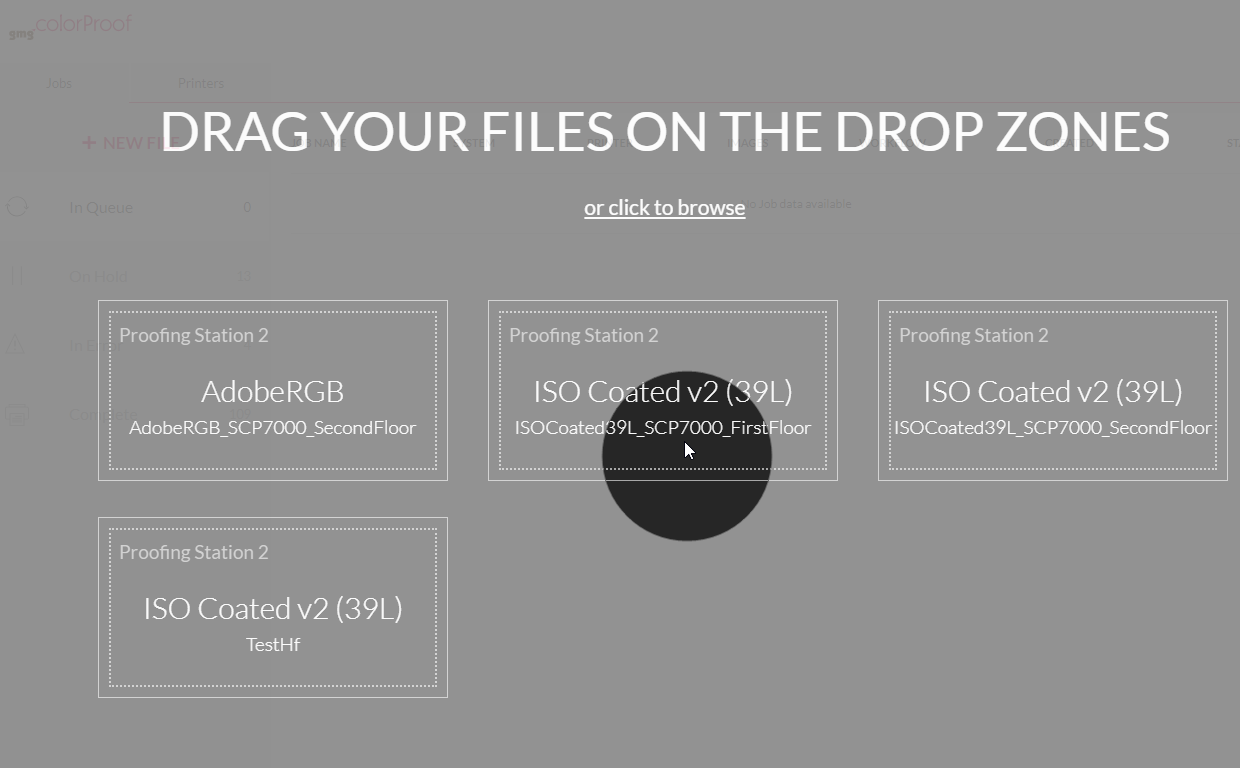
Cleaner drop zones: Drop zones have been visually refined for better clarity. Font sizes were adjusted and layout improvements were made to create a more organized and consistent look.
Drop zones are sorted by proof standard (here: GRACol, ISO, PSO). We are thinking of changing this logic and welcome user feedback on this under ux@gmgcolor.com.
-
Improved name display: Previously, long workflow or calibration set names were cut off. Now, they’re shortened with ellipses — and you can simply hover over them to see the full name. Workflows are now sorted alphabetically:
March 19, 2025
This version provides higher stability and fixes several bugs. We recommend you to always install the latest GMG ColorProof version 5.16.0.164 to benefit from all improvements.The most important bugfixes:
Interrupted job synchronization
After an unspecified period, files uploaded via GMG ColorProof GO failed to reach GMG ColorProof, or large job lists were only partially displayed in the GMG ColorProof GO web interface.
June 17, 2024
Access multiple apps with just one login
GMG ColorProof GO now uses our Single-Sign-On (SSO) technology, also utilized by GMG ColorCard and our web platform GMG Manage. You can access all these applications and future ones with a single login while benefiting from improved security standards as well. Simplify account management and streamline access across GMG products by installing the latest version now.
May 2, 2024
This version provides higher stability and fixes several bugs. The most important bugfixes:
Failed pairing with GMG ColorProof
At times, authentication would time out during the pairing attempt with GMG ColorProof, and the pairing process was terminated with an error message.
February 14, 2023
Map and change image channels online
What do you do when your job has been paused because a color could not be mapped? Right, you open the browser — because with GMG ColorProof GO, you can now map and change channels online. Just select the relevant job and click the Edit button in the details pane on the right. Then either replace the channel name with an alias name or define the preferred color equivalent in CMYK or Lab. You don't want to print the channel at all? Then, of course, we offer you this option as well. You can edit the image channels online for all target systems that have installed GMG ColorProof 5.14 and later.
June 24, 2021
End-to-end encryption
All PDF and images in the cloud will be safe-guarded by an end-to-end encryption using individual private keys on each GMG ColorProof system, which provides the highest level of data security. No one without a key will be able to access the content.
June 21, 2020 (requires ColorProof version 5.12.1.309 and later)
Print multiple copies
You can now select the number of copies of a job you want to print. On the Jobs tabbed page, click the + NEW FILE button and then click to browse. Select the number of copies.
Search and filter the printers, systems, and users view
The search and filter function is now supported for all views in GMG ColorProof GO, including Systems and Users. On the Printers page, click the Search button and enter a search term. By clicking on a filter shown on the left side, you can toggle the filter on and off.
May 28, 2020 (requires ColorProof version 5.12.1 and later)
Search and filter the jobs list
Trouble finding the job you are looking for? Now you can easily filter the list and even use multiple search terms. On the Jobs page, click the Search button and enter a search term. By clicking on a filter shown on the left side, you can toggle the filter on and off.
April 29, 2020 (requires ColorProof version 5.12.0.361 and later)
Create jobs in GMG ColorProof GO
You can upload a document and easily create a new print job by drag-and-drop from any location any time. The document will be sent automatically to the remote GMG ColorProof system.
On the Jobs tabbed page, click the + NEW FILE button to show all Drop Zones you have access to. Simply pick up a document and drop it on one of the drop zones.
May 30, 2020 (requires ColorProof version 5.12.0 and later)
 Invite new users via e-mail
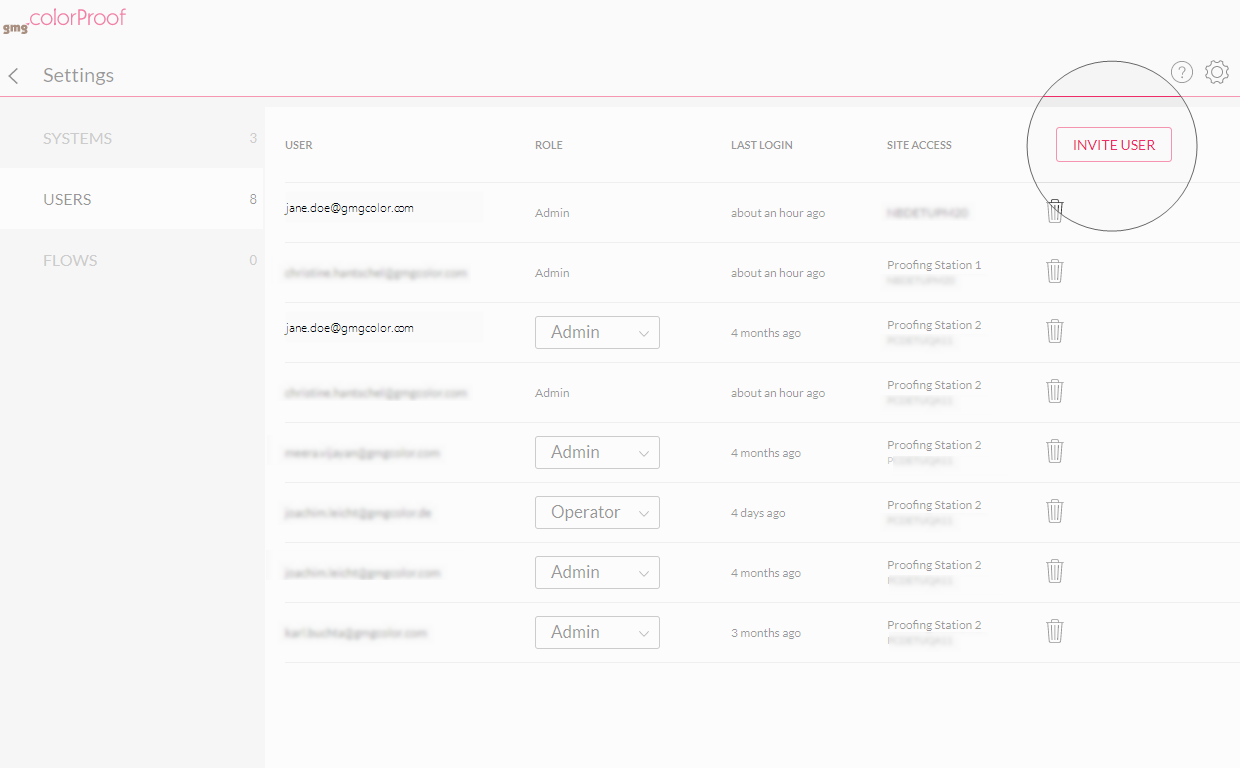
Up to now, each user needed to open GMG ColorProof and connect to GMG ColorProof GO. Now, a user with Admin role can invite a new user by the click of a button in GMG ColorProof GO, without using the GMG ColorProof application. The invitation will be sent by e-mail.
Click the Invite User button on the right side of the users list and enter the e-mail address of the new user, select the system you grant the user access to, and the user rights.
July 31, 2019 ( requires ColorProof version 5.11.1 and later)
Job details, printers, and more
- You will now be able to see job details including image names, proofing condition, verification status, dimensions, color channels, and workflow information on the info pane on the right side.
- The Printer view shows the installed printers and their status. See if printers are idle or out of ink and optimize throughput.
- New views have been added to manage users and sites. See which users are authorized to monitor which GMG ColorProof system.
- Get an overview of your GMG ColorProof systems and keep track of your licenses. See which systems are currently online and running.
Comments
0 comments
Please sign in to leave a comment.