
New in version 5.11.2 - October 23, 2019
New PANTONE® Coated Uncoated Spot Color Sets
PANTONE® added 294 new colors to the previous versions of PANTONE® Coated Uncoated formula guides.
The new spot color sets PANTONE® Solid Coated V4 and PANTONE® Solid Uncoated V4 are now available in GMG ColorProof.
Please refer to the manufacturers website to learn more about the new color collection.
https://www.pantone.com/products/graphics/formula-guide
New GMG ProofMedia studio OBA semiMatte 200
GMG ProofMedia studio OBA semiMatte 200 enables proofing of products printed on coated production paper containing optical brightening agents (OBAs) such as magazines or brochures but also packaging.
For most applications in job and publication printing according to PSO Coated v3 (FOGRA51), proofing on OBA media is the right choice.
With its light grammage, flat-matte surface, and a slightly higher gloss, GMG ProofMedia studio OBA semiMatte 200 aligns very well both with thickness and coating of typical production papers used in publication printing.
New in version 5.11.1 - July 31, 2019
Avoid unnecessary recalibration—with an automatic check upfront
In GMG ColorProof, a recalibration in regular intervals ensures the highest proofing stability and color accuracy. With the new feature Calibration Check Upfront, the Automatic Calibration Scheduler is now able to decide without user interaction whether the printer needs to be recalibrated or not. This enables a fully automated printer calibration process.
The calibration control strip upfront detects the calibration status of the printer with high accuracy and a recalibration is performed only, if the result is above a user defined threshold. This feature saves valuable production time, ink, and media for unnecessary recalibrations.
The Calibration Check Upfront is available for Epson SureColor P printers and Epson Stylus Pro x900 and x890 printers with integrated measuring device ILS30 and requires a GMG ProofControl Inline license.

You can activate and deactivate the option here: Output Printers Automatic Calibration Scheduler Calibration Check Upfront. You can also define the Average delta E tolerance for this check.
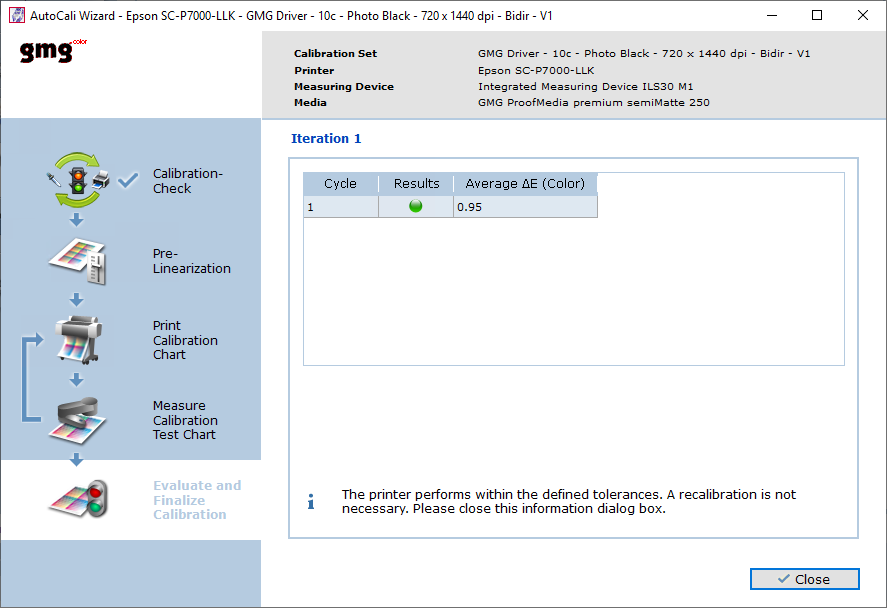
The screenshot shows a successful check. Average delta E of the GMG Calibration Control Strip is 0.95 and thus passes the 1.0 tolerance defined by the user. The scheduled printer recalibration is canceled.
ColorProof GO gets interactive—with job and printer actions
So far, ColorProof GO has already enabled you to comfortably monitor your proofing systems and printers, and to keep track of your proof jobs from anywhere at anytime. Now, the browser based application offers you a simple remote job management as well.
You can put a currently printing job on hold, start the printing, and delete proof jobs.
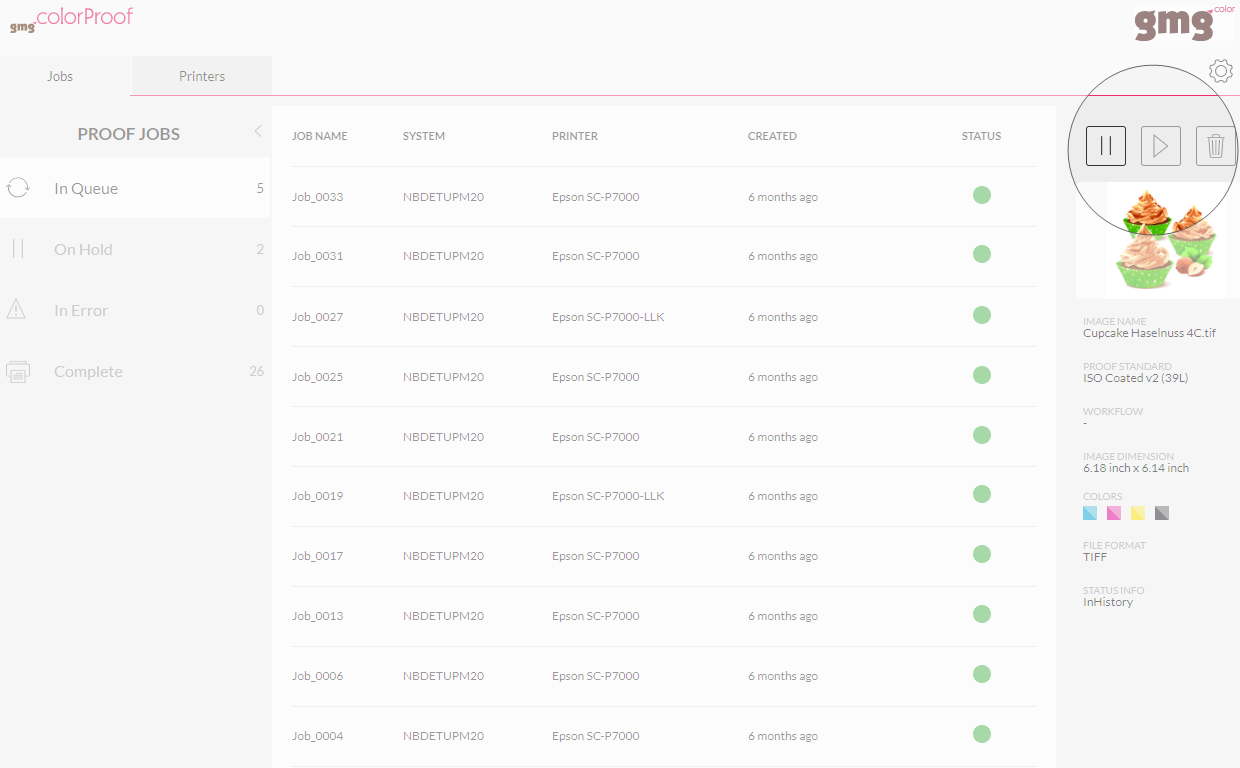
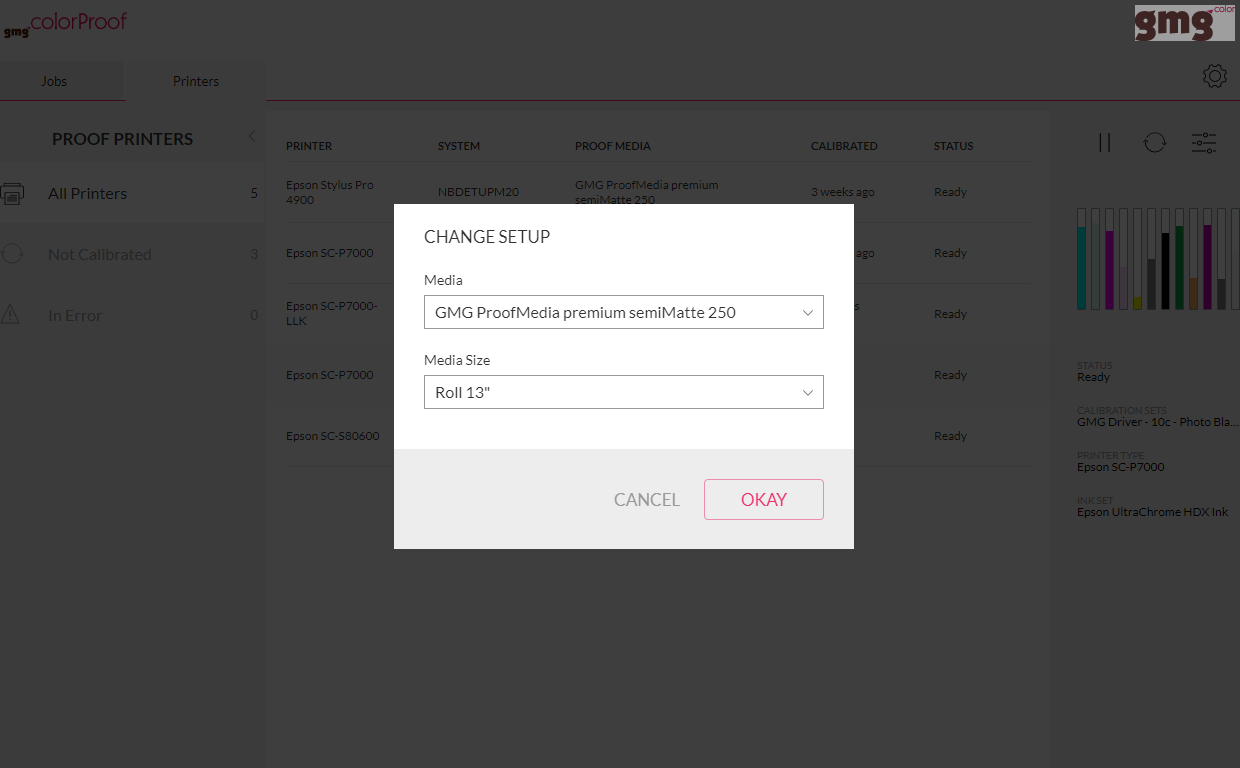
You are also able to remotely control your printers, for example, pause and restart a printer queue, select a different media type and size, or start an automated recalibration.

PANTONE METALLICS Solid Coated
PANTONE released a new collection of metallic colors, combining previous versions of PANTONE Metallic coated and PANTONE PREMIUM METALLICS coated, plus additional 54 colors and a new Rose Gold base ink.
The new spot color set PANTONE METALLICS Solid Coated is now available in GMG ColorProof.
Please refer to the manufacturers website to learn more about the new color collection.
https://www.pantone.com/products/graphics/metallics-guide
New in version 5.11.0 - May 21, 2019
ColorProof GO: Job details, printers, and more
We extended the capabilities of GMG ColorProof GO, to provide you with an even better overview for web proofing across sites.
You will now be able to see job details including image names, proofing condition, verification status, dimensions, color channels, and workflow information on the info pane on the right side.
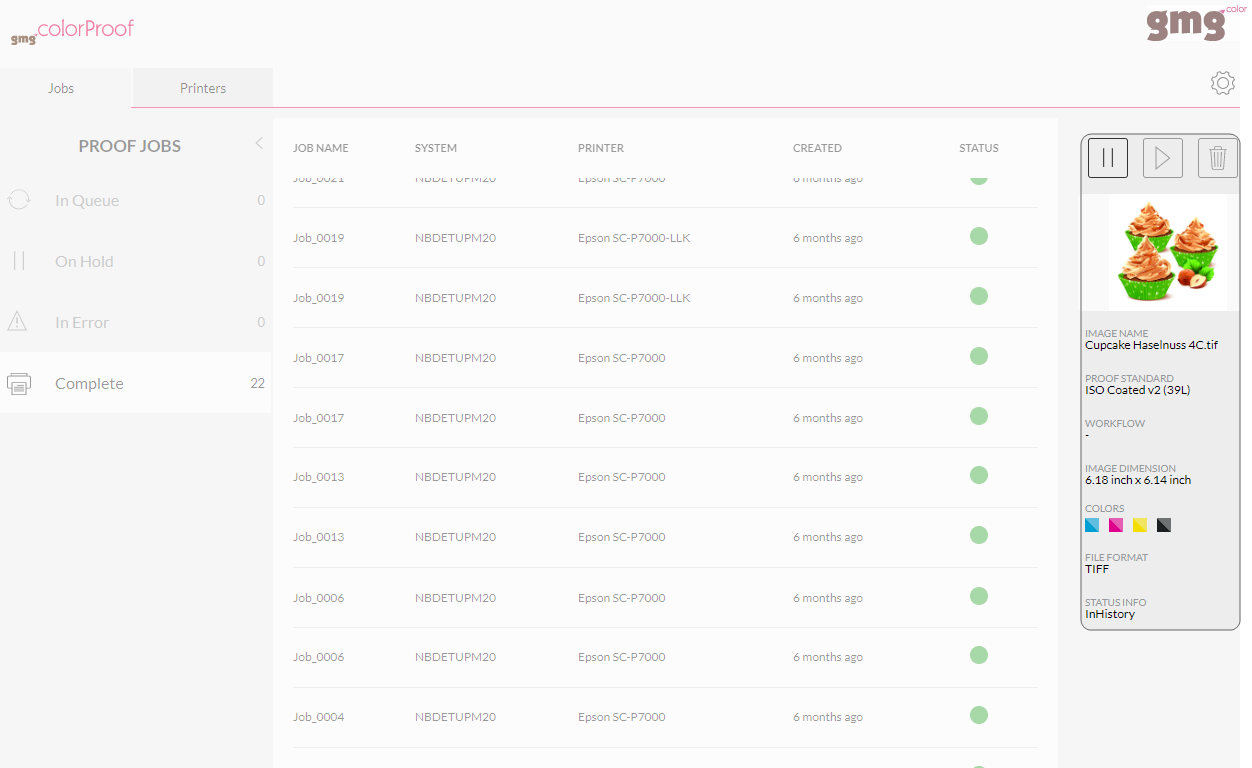
The Printer view shows the installed printers and their status. See if printers are idle or out of ink and optimize throughput.
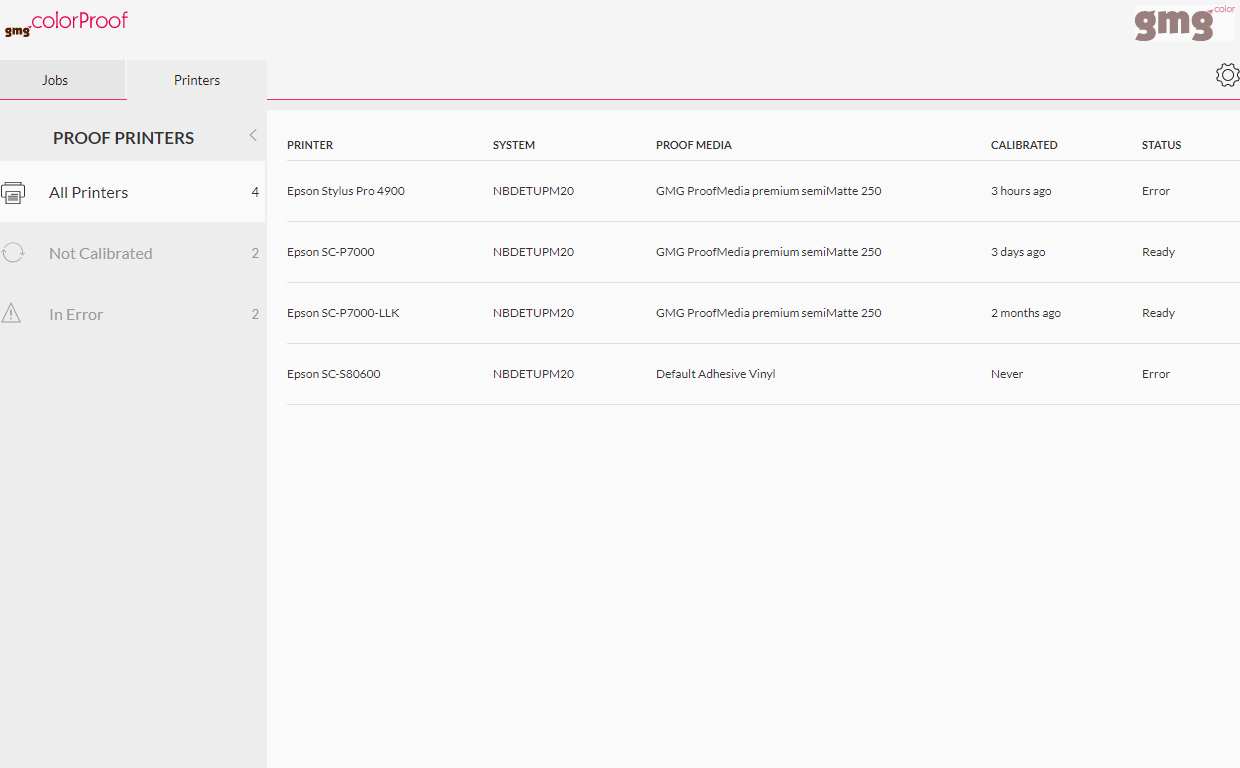
New views have been added to manage users and sites .
See on a glance which users are authorized to monitor which GMG ColorProof instance.
Get an overview of your GMG ColorProof systems and keep track of your licenses. See which instances are currently online and running.
Adobe PDF Print Engine 5.1
The integrated RIP of GMG ColorProof is based on the Adobe PDF Print Engine (APPE). To provide compatibility with the latest PDF technology and Adobe CC applications, the Print Engine has been updated to 5.1.
For more information, please follow the link to the Adobe website:
https://www.adobe.com/products/pdfprintengine.html
New printer-media combinations
For Epson SureColor SC-P 6000/7000 STD series, new calibration sets and profiles supporting Photo Black ink have been added, so that no switch between Photo and Matte Black inks is required anymore when using multiple GMG proof media types.
Epson SureColor SC-P 6000/8000, 8c - PhotoBlack - 720x1440 dpi - SCX on GMG ProofPaper matte 140
List of profiles:
- Epson_SCP6000_720x1440dpi8cPhotoBlackSCX_GMGmatte140_AdobeRGB_V1.mx4
- Epson_SCP6000_720x1440dpi8cPhotoBlackSCX_GMGmatte140_ECIRGBv2_V1.mx4
- Epson_SCP6000_720x1440dpi8cPhotoBlackSCX_GMGmatte140_sRGB_V1.mx4
- Epson_SCP6000_720x1440dpi8cPhotoBlackSCX_GMGmatte140_3DAPv3-PT4-47L_V1.mx4
- Epson_SCP6000_720x1440dpi8cPhotoBlackSCX_GMGmatte140_ISOnewspaper26v4_V1.mx4
- Epson_SCP6000_720x1440dpi8cPhotoBlackSCX_GMGmatte140_PSO-Uncoated47L_V1.mx4
- Epson_SCP6000_720x1440dpi8cPhotoBlackSCX_GMGmatte140_PSO-Uncoatedv3-52_V1.mx4
- Epson_SCP6000_720x1440dpi8cPhotoBlackSCX_GMGmatte140_WAN-IFRAnewspaper26v5_V1.mx4
Epson SureColor SC-P 5000-LLK/7000-LLK/9000-LLK, 8c - PhotoBlack - 720x1440 dpi - SCX on GMG ProofPaper matte 140
List of profiles:
- Epson_SCP7000-LLK_720x1440dpi8cPhotoBlackSCX_GMGmatte140_AdobeRGB_V1.mx4
- Epson_SCP7000-LLK_720x1440dpi8cPhotoBlackSCX_GMGmatte140_ECIRGBv2_V1.mx4
- Epson_SCP7000-LLK_720x1440dpi8cPhotoBlackSCX_GMGmatte140_sRGB_V1.mx4
- Epson_SCP7000-LLK_720x1440dpi8cPhotoBlackSCX_GMGmatte140_3DAPv3-PT4-47L_V1.mx4
- Epson_SCP7000-LLK_720x1440dpi8cPhotoBlackSCX_GMGmatte140_ISOnewspaper26v4_V1.mx4
- Epson_SCP7000-LLK_720x1440dpi8cPhotoBlackSCX_GMGmatte140_PSO-Uncoated47L_V1.mx4
- Epson_SCP7000-LLK_720x1440dpi8cPhotoBlackSCX_GMGmatte140_PSO-Uncoatedv3-52_V1.mx4
- Epson_SCP7000-LLK_720x1440dpi8cPhotoBlackSCX_GMGmatte140_WAN-IFRAnewspaper26v5_V1.mx4
New proof standards
PSO MFC Paper (41L), PSO SNP Paper (42L), PSO LWC Standard (46L) on Epson SureColor SC-P 6000/7000 printers and GMG ProofMedia premium OBA semiMatte 250
List of profiles:
- Epson_SCP6000_720x1440dpi8c_GMGsemimatte250-OBA_PSO-MFC41L_V1.mx4
- Epson_SCP7000-LLK_720x1440dpi8c_GMGsemimatte250-OBA_PSO-MFC41L_V1.mx4
- Epson_SCP7000-LLK_720x1440dpi10c_GMGsemimatte250-OBA_PSO-LWC-Standard46L_V1.mx4
- Epson_SCP7000_720x1440dpi10c_GMGsemimatte250-OBA_PSO-SNP42L_V1.mx4
Automated patch notification
Instead of checking the GMG website, downloading a patch, and manually install it, there is now a very easy way to ensure that GMG ColorProof is always up to date. What's more, GMG will deliver patches on a more frequent basis to make your proofing system as reliable as possible.
When starting the application for the first time on a new day, you will be notified by the message "New patch available.". You simply need to click Yes to install the patch. GMG ColorProof will take care of the rest, including the required restart of the application.
Generally, the patch installation will take only a brief moment. (The notification will not include larger software updates, which will require more time, to make sure that your work can proceed seamlessly.)
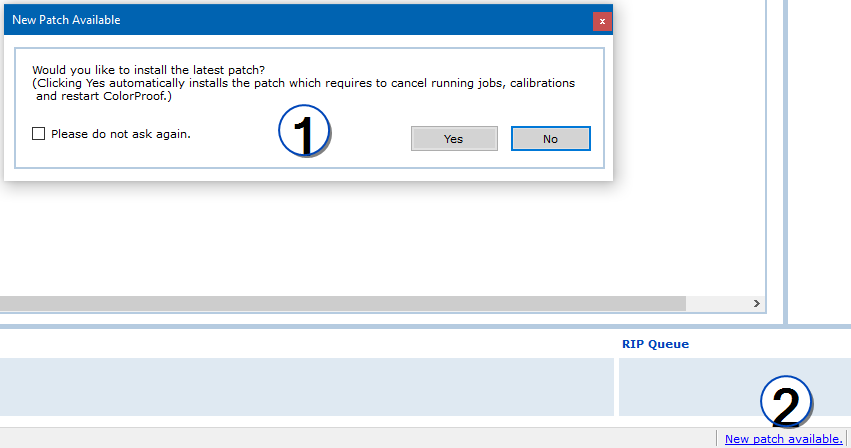
In the message box (1), you can click the Please do not ask again option so that the application does not automatically show this message for the current patch anymore. The message in the status bar of the main window (2) will still be available. You can click it to bring up the message and start the installation. When the next patch is released, you will again be notified automatically by the message box.
User experience
And some more exciting news from our GMG team: In recent years, investing more effort in improving the user experience of our products, we have learned to establish a culture and mindset that embraces user experience with lean-agile working methods adapted from the Lean Startup movement and Scaled Agile Framework. Our guiding principle of lean UX is continuous exploration—the quest of truly understanding the problems we encounter in our industry and persistently moving forward to build evidence for potential solutions and improving them until we can give the best possible value.
Learning how our customers use our products really helps us to find patterns to improve the quality and fit of our offerings. To gather quantitative data, we collect anonymous usage information from within some of our applications such as GMG ColorProof from version 5.11 on. We do not collect any personal information or data from processed documents. If you do not wish to share this information with us, you can easily opt in and out at any time (System > General tabbed page > Default Settings > Allow Anonymous Usage Data).
You can find more information on this topic here:
Comments
0 comments
Please sign in to leave a comment.